
Vellum: find a part in a DWG or DXF drawing
Pick the mark, pick the part, see it proven against the BOM weight.
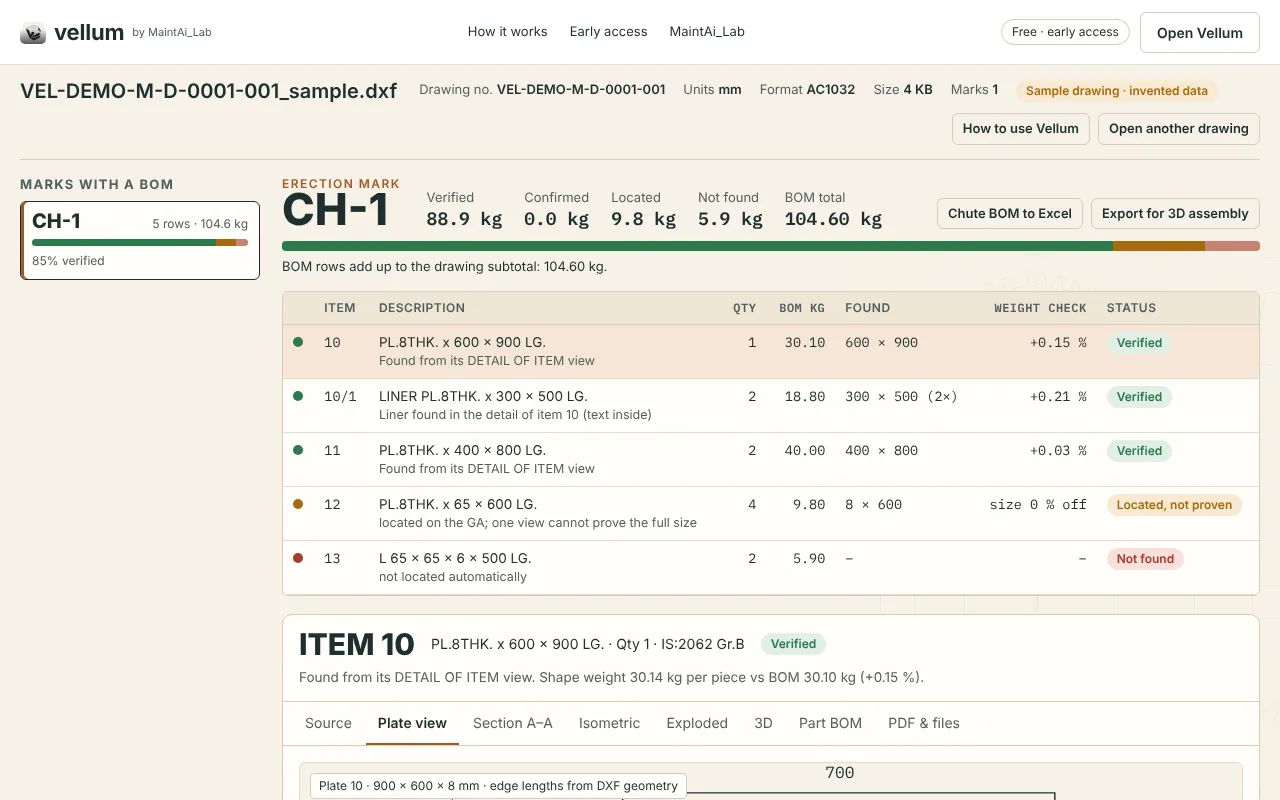
Vellum reads a fabrication drawing, finds the part you need from its BOM, and checks the shape it found against the BOM weight. Each part is marked Verified, Located, not proven or Not found, so you know what you can trust before you cut.
Why Vellum
A fabrication drawing holds the answer for a replacement part, but finding it takes time: the general arrangement, the BOM, the DETAIL views and the liners are spread across the sheet, and a size read from one view can be wrong. On site the question is simple: what exactly do I cut, and can I trust it?
Vellum answers that from the drawing itself. It follows the BOM row to the part's outline, works out its weight from area × thickness × 7850 kg/m³, and compares it with the BOM weight. A match within ±3 % is marked Verified. Vellum never invents a dimension: parts it cannot prove stay amber or red.
How Vellum works
- 1 · Open your drawingA DWG or DXF up to 50 MB, or the built-in sample drawing.
- 2 · Pick the mark, then the partClick an erection mark (for example CH-3), then the part from its BOM list.
- 3 · See it provenVerified, Located, not proven, or Not found, with the reason in the Source tab.
- 4 · Download what you needAn A3 part PDF, a flat-pattern DXF for proven plates, or the mark's BOM in Excel.
Views and files for the shop
For each part you get Plate, Section, Isometric, Exploded and 3D views. Sections are generated through a flat plate whose outline was found in the drawing and passed the weight check; edge lengths come from the drawing geometry.
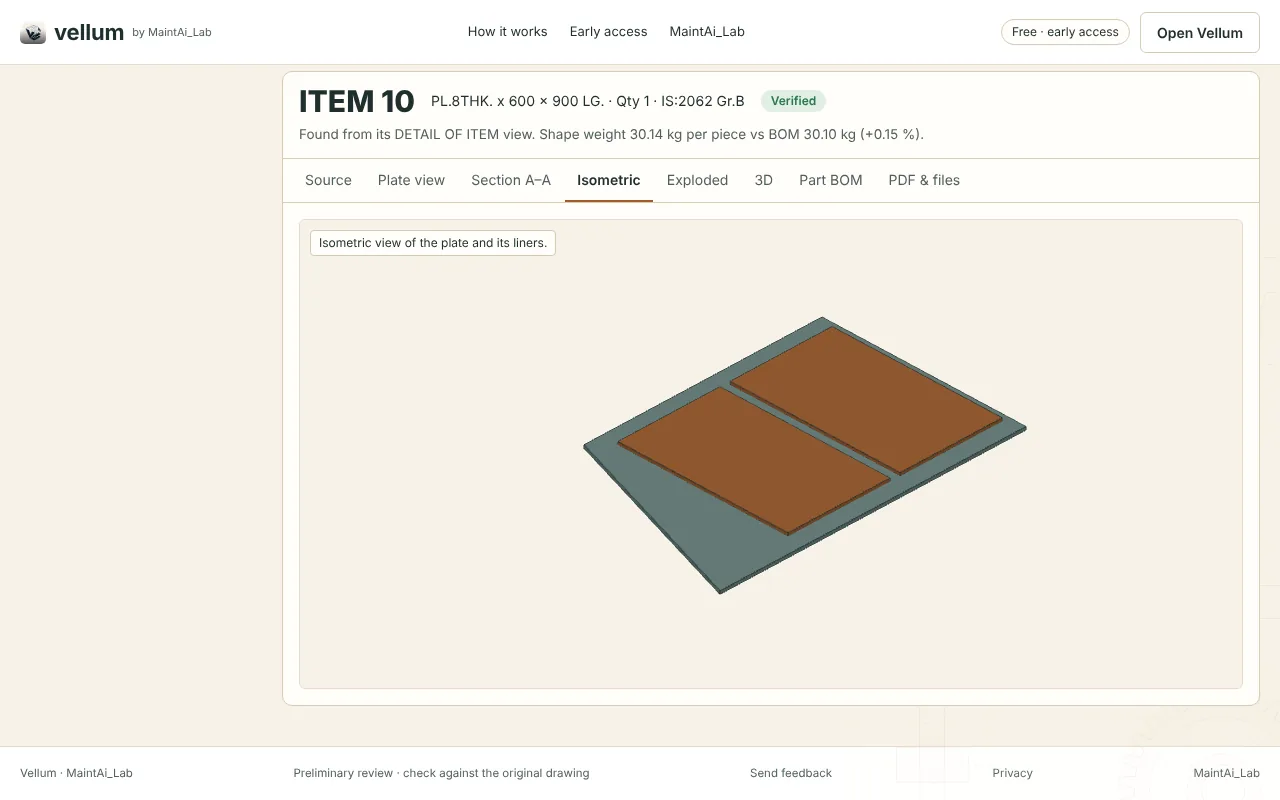
- A3 part PDFPlate, section, isometric and BOM on one sheet.
- Flat-pattern DXFFor plates that passed the weight check.
- BOM in ExcelThe whole BOM of the erection mark.
- Several sheetsUse “Add related sheet” when a chute is drawn over several sheets; Vellum follows BOM rows, DETAIL views and liners across them.
Clear about the limits
- 3DFlat plates with their holes and liners only. Bent plates, rolled sections, angles and full assemblies are not modelled yet.
- PDF, scans, photosA PDF, TIF or PNG has no measurable CAD data, so Vellum cannot prove a part from it. It offers a one-step AI read-and-import instead, always marked AI-read, not verified.
- DWG versionsAutoCAD DWG R14 to 2018 (the format AutoCAD 2018 and later still save) or DXF. If a DWG does not open, save it as DXF in AutoCAD.
- Preliminary stampDownloads carry a PRELIMINARY stamp until the part is verified or confirmed by an engineer. Check against the original drawing before cutting.
Your drawing stays on your computer
Vellum reads the drawing in your browser. Nothing is uploaded, there is no account and no analytics. A copy is kept in your browser only, so you can continue after a refresh; “Remove saved copy” deletes it. DWG files are converted to DXF inside the browser by an open-source converter based on LibreDWG.
Vellum is an independent tool by MaintAi_Lab and is not affiliated with Autodesk. AutoCAD and DWG are names of their owners.
Vellum privacy policy ↗ · Website privacy · Vellum on the tools page
Standards behind the work
Fabrication drawings are made to these standards. Check the edition you work to: MechAtlas, also by MaintAi_Lab, shows each standard's current edition, whether it is being revised or replaced, and what to use instead.
- ISO 128Drawing presentation, lines, views and sections
- ISO 129-1Dimensioning
- ISO 2768-1General tolerances
- ISO 1101Geometrical tolerancing
- ISO 2553Welding symbols on drawings
Frequently asked questions
Is Vellum free?
Yes. During early access every feature is free, with no sign-up and no payment.
What does “Verified” mean?
The part's closed outline was found in its DETAIL view or as a liner, and its weight (area × thickness × 7850 kg/m³) matches the BOM weight per piece within ±3 %.
Can Vellum create missing sections and measurements?
Only from evidence. Vellum never invents a dimension; parts it cannot prove stay amber or red.
Is my drawing uploaded?
No. It is read in your browser and a copy is kept only in that browser.
Can I try it without my own drawing?
Yes. Open Vellum and choose “try the sample drawing”. It uses invented data.
Try it on the sample drawing
Open Vellum, load the sample drawing and follow one part from the BOM to its verified views.